
 Karan Johar is a one of the outstanding directors of Hindi cinema and when he appreciates a movie or performance it does matter. With one more not-so-happening year for Bollywood coming to an end KJo picks his favorites of the year gone by.
The year that went by saw many duds at the box-office and very few hits and all the more lack of good performances on which Karan says, “I have liked very few films this year, very few films and performances have stood up at the box-office.” So, what were the good things that happened to Hindi cinema last year according to Karan? “When I saw Amitabh Bachchan in “Paa’ and emergence of Ranbir Kapoor…I realized that these were the two highlights of the year,” says the talented director.
12/28/09
Amitabh Bachchan and Ranbir Kapoor are Karan Johar’s favorite
Kim Kardashian Chicken salad advertisement is hot and racy
 Kim Kardashian has done an advertisement for the Carl Jr. chicken salad. The advertisement is hot and racy and is sure to raise the temperatures and be an Internet sensation too.
The Carl Jr. burger joint once had Paris Hilton in a skimpy black swimsuit bent over while chowing down on a hamburger and soaping up with suds while washing a car.
And thisadvertisement by Kim picks up right where Paris Hilton left off. It shows off the Playboy centerfold sex appeal in the bed and in the bubble bath too. “I’m such a neat freak,” Kim says while enjoying a sexy picnic in bed. “Everything’s gotta be clean, crisp and tasty.” She eats dripping bites of salad with her hands as the camera closes in on her lips and cleavage. “And while the best things in life are messy, it’s fun to get clean,” she says as she sinks into a bubble bath, still picking at the salad. In the advertisement the hot Kim Kardashian shows off her curvy body and lounges about in bed, with the chicken salad for company.
Her bubble bath is also slow and sensuous and some critics are rightly calling thisadvertisement as ‘food porn’, even though there is no nudity involved here at all.
Miley Cyrus stays away from stress for heart condition
 Miley Cyrus has revealed how she handles stress for the sake of her heart.
The Hannah Montana star has been diagnosed with tachycardia, a non-life-threatening affliction that means her heart rate exceeds the range of a normal resting one.
Cyrus said that she always worries about her heart when she’s on stage or stressed, reports the Daily Star. She said: “I try not to get too stressed.
I step away from the situation and put yourself 10 years from where you are now and then say, ‘Alright, is this really something that is going to be significant in my life? Is this going to change where I’m going to be in 10 years? “
At my happiest moment, is this still going to be weighing on my mind? No? Otherwise I’ll just (worry) myself to death, where I’ll just be like, I have to call, or I have to fix it, or I have to do this. Finally, it’s just like it will all work out on its own,” she added.
Natalie Portman dating ‘Star Trek’ actor
 Hollywood actress Natalie Portman is romancing Chris Hemsworth, elder brother of Miley Cyrus’ Australian boyfriend. Portman met “Star Trek” actor Hemsworth after they were cast together in the forthcoming movie “Thor”, reported contactmusic.com. Shooting is expected to begin in January next year, but the two are dating already. “Sparks have been flying since their first meeting. He seems to have a crush on her and she clearly loves the attention,” said a source. Portman had been single since splitting from folk rocker Devendra Banhart last year.
Jessica Simpson Denies Link Up With Tiger Woods
 After bunches of cocktail waitresses and porn stars, with a model or two thrown in, Tiger Woods has finally been linked with someone who can, at least, be said to have some class. The latest one to have been added to the long list ofTiger Woods’ scandals is Hollywood actress Jessica Simpson. However, she has denied all of the rumors that have been circulating around them. The rumor was first published in a gossip magazine that claimed that Tiger Woods and Jessica Simpson had met at a golf tournament, sometime around July this year. She was supposedly with Tony Romo, who was her boyfriend at that point of time. The magazine had also reported thatTiger Woods and Jessica Simpson had flirted throughout the tournament, and then had graduated to exchanging text messages afterwards, probably a few days later. The 29 year old actress and the 33 year old golfer had allegedly gotten to know each other better during the singing of the national anthem prior to the beginning of the golf tournament. In fact, a photograph had allegedly been clicked in the tournament that showedTiger Woods with his hand draped over the shoulder of Jessica Simpson . Suspicions about an affair fledgling between the two became even stronger after the actress broke up with Tony Romo just eight days later. However, despite such confirming evidence, Jessica Simpson firmly denied the veracity of the rumors. A friend of hers claimed that the two had only just met at the golf tournament and had posed for a photoshoot, and the breakup had nothing to do with it. Jessica Simpson had also tweeted that she has nothing to do with the golfer.
No more Internet for Gomez
 Selena Gomez has quit the internet. She would earlier film videos regularly to share with her fans on YouTube.com, but she stopped uploading the videos after she received a number of hurtful comments. The “Wizards of Waverly Place’ star believes that quitting the internet has made her feel much better in real life. She has stated that she doesn’t go on any sites anymore, doesn’t read comments and it makes her feel good. She thinks that while sites like MySpace, Facebook are a medium for people to express their thoughts anonymously just because no one’s watching them, it can get dangerous at times.
Sherlock Holmes Returns
 After being in circulation for decades, Sherlock Holmes is back this Christmas in the form of Robert Downey Jr, and taking the shoes of Dr Watson is Jude Law. The film, directed by Guy Ritchie and having Joel Silver as the producer, has been released in the UK as a Christmas gift to all the fans of Arthur Canon Doyle.
The main plot of the movie revolves around a ‘human sacrifice ritual’ being made by a Lord Blackwood (which is played by Mark strong), who is stopped by the duo and imprisoned and awaiting execution. However, after being executed, Blackwood’s ghost or Blackwood himself is reportedly seen alive by witnesses who find his tomb broken.Sherlock Holmes and Dr Watson delve head-first into the case to try and solve it. The pair soon finds themselves amidst secret societies (Temple of the Four Orders) which is being headed by the executed Lord in order to take over the world and lead it. What follows is a race against the clock, with Holmes and Watson saving an attack on the British Parliament made by the same society. In the end, the detective finds how the Lord managed to frame his death and bring about all the paranormal activity. The story also hints at a next edition since Holmes finds another mystery before the movie ends.
The main cast is supported by Rachel McAdams, Mark Strong, Kelly Reilly and Eddie Marsan. The movie is being said to be a good watch and has received a good reception all over. Even though the direction is said to be a bit shady, the performances make up for everything else.
Increase traffic to your blog 100 times
"Increase traffic to your blog 100 times, necessarily you I'll be curious what solution? Yes, I have, but currently only for the blogspot, you can apply another blog sympathy.
Go straight to the problem, my solution is, extend participants write on your blogspot. You might also have thought about this issue, and make both me and you shared song questions is how to convince others to join members, writing for his blog. And here, I have the answer for you, it is a system-link banner, advertising manager under the author's posts.
You know, blogspot allows up to 100 participants write. You try to think of view, with the number of members is regarded as 100-fold increase blog traffic may have increased 100 times, also if you consider the quality, because the members want to assert the brand message, the said increased traffic 100 times as still quite modest.
Remove hidden-Blogspot Blogger Navbar
Blogger has just started implementing your advertising strategy on the free blog service blogger.com. This never happened and everyone thinks Google will never show the ad but that did not happen when advertisers began to be present on virtually all over the blog using their services.
Often this ad will show on the area where the navbar Ever is usually for the default icon as Dashboard, New Post or Customize and these ads will appear random, non-permanent so you rarely see it. However, the screen below will illustrate this problem:

According to the terms specified at ddieuf Blogger TOS (Terms of Service) Google will not specify that you required to display the navbar using the service should not hide the navbar is against the law.
There are many ways to hide navbar in blogger.com, but many tricks have failed, however, which is quite a different procedure or that Aditya has also deployed to help you effectively hide the navbar.
Clear guidance Blogger nav-bar
Method 1:Please log in to your blogger, to the LAYOUT> EDIT HTML. and paste the following code immediately after the card is:
/* By Aditya http://the-lastword.blogspot.com/ / * By Aditya http://the-lastword.blogspot.com/
———————————————– */ ---------------- * /
div.navbar { div.navbar (
opacity:0.0; opacity: 0.0;
display:none; display: none;
} )
Method 2:
For blogs using Classic Template, you just add the code to the right on this small card and then Save Template Now how's it: <==!--
<==body>
--==>
Please note you must remove the sign == go (I added to my code does not damage you do know how to write the HTML code that is not changed when the Post is just me in the comment thanks nhé)
For use Template Layout blog, after you add the code on the same location and click Save, then blogger will ask you to agree to delete the widget is not the navbar, you press the Confirm and Save is complete. After this step, you delete all navbar of the blog, it is not downloaded again, in the Page Elements page of your now is no longer the appearance of the navbar, which looks very nice:

Earlier in the article about Instructions Create Admin Control Panel in Blogger.com mentioned a different procedure is quite common that you can reference more:
Guide Blogger nav-bar hidden
Follow these steps. Can be applied to any template you are using:
- On the Layout> Edit HTML in Blogger dashboard.
- Find the card that contains this line: </ b: skin>
- Immediately before this, you add the following code:
#navbar-iframe { # navbar-iframe (
height:0px; height: 0px;
visibility:hidden; visibility: hidden;
display:none display: none
} ) - Then Save Changes are done.
You can see the video demo that know how to find if the reader still does not understand 
Create bar reading Feed / RSS Ticker form (updated) for Blogspot

You may be hard to imagine, so please look at the screenshot of this widget nhé:

Feed reading bar / RSS Ticker form (turn off Show Summary)
Some advantages of Thanh Feed / RSS Ticker that their synthesis is as follows:
Thanh Ticker supports two button Back / Next to the reader can easily see it.
- Load feed fast and stable
- Support to read the latest content from 25 Feed.
- Making up less space, and can adjust the length of the Blog.
- There are more features Summary Show (display content at a glance).
To create Thanh Feed / Rss Ticker, you just click here, then set the options for Thanh Ticker by the following:

Quick Add To On the right you will see a box to preview widget, attached below is the script that you copy the page elements in Blog (Note: You can use the . Blogger Widget below to insert the blog faster).
Chú ý Note
If you have set as Ticker Widget Recent Post in the Blog, when you click on the link of any article on the Ticker for inspection, but not be redirected to the correct message but moved to comment page of the article that the overcome as follows:Log in to Blogger> Settings> Site Feed, Advanced mode as shown below:

Feed your setting comments for each post to no, save again . And wait a few minutes to redirect RSS from Blogger to comment posts. Bad navigation error will be overcome
Creating popup windows when dragging the image
After a stroll around the blog of the pro, VnTim ™ accidentally read this procedure FanDung the blog, although this is only a few lines of CSS is simple but the pictures are very or popup. Rất cám ơn FanDung về thủ thuật này. Many thanks FanDung about this procedure.
CSS is the code with a few we can create a popup window to display a professional image without javascript. CSS is the code with a few we can create a popup window to display a professional image without javascript. Procedure allows the display of the original image when the popup window is dragging on. Procedure allows the display of the original image when the popup window is dragging on.
See live demo here: http://fandung.110mb.com/test/popup-images-view.html

To do this, you first insert CSS into the code before the closing </ head> in the code template:
- Login blog
- The layout
- The edit HMTL code
- Insert the CSS code below into the first line of code </ head>
.img-thumbnail{ . img-thumbnail (
position: relative; position: relative;
z-index: 0; z-index: 0;
} )
.img-thumbnail:hover{ . img-thumbnail: hover (
background-color: transparent; background-color: transparent;
z-index: 50; z-index: 50;
} )
.img-thumbnail span{ . img-thumbnail span (
position: absolute; position: absolute;
background-color: #ffffff; background-color: # ffffff;
padding: 5px; padding: 5px;
left: -1000px; left:-1000px;
border: 1px solid #000; border: 1px solid # 000;
visibility: hidden; visibility: hidden;
color: black; color: black;
text-decoration: none; text-decoration: none;
} )
.img-thumbnail span img{ . img-thumbnail span img (
border-width: 0; border-width: 0;
padding: 2px; padding: 2px;
} )
.img-thumbnail:hover span{ . img-thumbnail: hover span (
visibility: visible; visibility: visible;
top: -100px; top:-100px;
left:100px; left: 100px;
} )
</style> </ style>
- The red code is located in the popup will appear on your blog. Adjust these two values to get the most appropriate location on your blog.
- Save template.
And finally the second HTML code:
<a class="img-thumbnail" href="#">
<img src="link ảnh1" border="0" height="98" width="130"/>
<span>
<img src="link ảnh1"/>
</span>
</a>Custom message displayed in the Label page
This is one of the basic tricks of the blogger. Usually when a load from a certain brand message, by default blogger will show results of 20 articles. This article will guide you adjust this number.
When you create a link to a certain brand of blogging, the default message displayed in the label will be 20 tracks, if you want to customize the message shown to link this link, you simply add the code is to link the link below.http://tenblog.blogspot.com/search/label/labevd?max-results=10
- With the value 10 is the number of messages displayed.
On it is your custom for a link to create your own label. If you want a custom message to the link label is located in the footer of the article is why? To do this you must customize Left code template.
1. First layout
2. To edit the HTML code
3. Select extended utility model
4. Find the code below (or similar): expr:href='data:label.url5. Add the code in red as below:
expr:href='data:label.url + "?max-results=10"
- Change the value of the 10 articles that you want to show.
- Depending on your blog that bco 1 2 ... code
expr:href='data:label.url
How many of you out with the code change
expr:href='data:label.url + "?max-results=10"
I wish you success.
I wish you success.
Option label (label) for the post on Blogspot
Label (label) are descriptive phrases, are assigned to each post (post). For example, you write an article on Yahoo, you can assign a label for it is yahoo, wrote an article about the extension for Firefox, you can label extension, firefox, ... This aims to classify messages according to each subject (topic, category) to help manage messages easier.
1. Using labels like?
Using the label is the label assigned to each article. Every time you write on the blog, please pay attention to the bottom of the frame editing posts that read: Labels for this post. This is where the label assigned to posts, please fill out the appropriate label on the frame.
There are also two categories:
Post Options: Adjust the date and time post, allowing readers have commented or not.
Show All: Displays all the labels of all the blog posts ever.
2. Manage and edit labels
To manage the label, after logging into the blog, select the card Posting | Edit Posts (management posts). If you click on a name label on the left side is a list of articles with the same label will show the right. Each message has a checkbox, you mark the checkbox if you want to select which messages.
Edit label: check post to edit the label by checking the checkbox, click a menu option from the Label Actions ...
Want to add a new label for this post, select New Label ..., enter the new label name. To remove a name from the label any post, click the name to remove the label under Remove label.
To edit a label for a series of articles (many messages at once) you must first remove the labels need to edit and then add a new label. For example, if you want to transfer all the messages are labeled to label Firefox Internet Explore do the following:
- Press the Firefox tab in the left window to display full article labeled Firefox.
- Select the message want to label by checking the checkbox. If you want to select all the messages labeled Firefox please click the Select All link at the top of the list of posts.
- From the Label Actions ... menu, click Remove label> Firefox.
- From the Label Actions ... menu, choose Apply label> New Label ...
- Enter the new label should be assigned to, in this case the Internet Explore. If you already have Internet Explore and labels do not need to create another label but instead simply choose Apply label> Explore the Internet is.
Inevitably you will also visit some Wordpress blog format, which posts the same topic are grouped into a general Category. With blogspot you can do so.
Note this case for my blogspot classic form. Short link to the form label: http://ten_blog/search/label/tennhan (you change the label name to match or link can also get this by: from the blog, right-click on the label and select Properties) . If you are using blogspot as Layout is simpler, just click Add Page Element and select the Label is.
Changing default Blogger Favicon browser
Favicon is a small icon (image) displayed in the address bar of browser.No also called icon love, and Pageicon urlicon. Usually the Favorite Icon Bloogger B is shaped like this:
 The benefits of creating and using favicon is, it helps you easily find your blog or website when people put your site on favorites or create bookmarked your site
 Most of the favicon will use size 16 * 16 pixel image format tail. Ico (can use both. Png or. Gif). So, ready to create a favicon? All you need is a program to create a favicon (. Ico) format.Neu you do not have a program to create image format. Ico, you can find them on the Internet ...
 Now your icon is ready ... You are just a few steps to create a nice favicon for your site ...
Sign in to your Blogger layout select layout>Edit html find this code (it's at the top of the template)
<data:blog.pagetitle/> And add the following code as in Figure

So that's it then. Please review results F5
Latest Headlines Widget V2 latest post
This is a widget showing summary of the latest articles on your blog, based on that readers can follow from such a blog easily and make your blog more professional. Widget is Hoctro doctor also wrote long ago but so too or you would like translated into Vietnamese for you easy. You can see photos of the widget is as follows:
How simple, just follow this three step only.
Step 1: Sign up to receive the code from the Google AJAX Feed API:
http://code.google.com/apis/ajaxfeeds/signup.html
You just click the box in the line I have read and agree with the terms and conditions (printable version) and enter the blog into my current web site URL and press Generate API
Keyla done. Immediately you get the code right in the line Your key is. Step 2: Insert the following code before the and remember to replace YOUR-KEY with the code of Google AJAX Feed API at this time.
<script src='http://www.google.com/jsapi/?key=YOUR-KEY' type='text/javascript'/>

<script src='http://www.google.com/uds/solutions/dynamicfeed/gfdynamicfeedcontrol.js' type='text/javascript'/>

<style type='text/css'>
@import url("http://www.google.com/uds/solutions/dynamicfeed/gfdynamicfeedcontrol.css");

#feedControl {
margin-top : 20px;
margin-left: auto;
margin-right: auto;
width : 440px;
font-size: 16px;
}
.gfg-title {
color : #612e00;
background-color: #FFF3DB;
}
.gfg-title a {
color : #612e00;
}
.gfg-root {
border: 1px solid #956839;
font-family: "Georgia", sans-serif;

}
</style>
<script type='text/javascript'>
function load() {
var homeUrl = "<data:blog.homepageUrl/>";
var feed = homeUrl + "feeds/posts/default";
new GFdynamicFeedControl(feed, "feedControl",
{numResults : 4});
<h6>Widget by <a href='http://vntim.blogspot.com/'>VnTim</a></h6>

}
google.load("feeds", "1");
google.setOnLoadCallback(load);
</script>
Step 3: Go to Layout> Page Elements, then formed the "HTML / JavScript new" then paste the following code in the box:

You can edit the numbers in the following line to adjust the number of messages allowed to show (default is 4 and maximum is 25).
new GFdynamicFeedControl(feed, "feedControl",If you want to change font or font just correcting this code to suit
{numResults : 4});
.gfg-title {
color : #612e00;
background-color: #FFF3DB;
}
.gfg-title a {
color : #612e00;
}
.gfg-root {
border: 1px solid #956839;
font-family: "Georgia", sans-serif;

}
Finally click Save to complete. As you will see the blog widget which as shown above. As you drag your widget into the top right look more beautiful.
The utility of free js Blog
p / s: For a Blogger blog, the js-kit Comments may be used in parallel with the Blogger comment system. That is the comment by js-kit comment appears in the Blogger Comments RSS and js-kit comments rss. All comments on the old blogger can import the js-kit rss cm through a simple
Account and Password here is your blogger account.
Step 2 will automatically upload code to the template by template. Xml blog up and press your Process Template. New template file editing will be provided. You down to and up to Blogger.
Can customize the settings for the Js-kit Comments: Your Setting in the right corner.
Additional options such as Emoticon, Embed YouTube, WYSIWYG editor, filter Akismet ....
# Comments appearance (skin) - Layout
# Allow safe html in comments - Allows an HTML editor mode (only the cards as b, i, u ...)
# Use WYSIWYG rich text editor - WYSIWYG Editor (like frame composed of Blogger)
# Allow video embedding - Allow embedded video (youtube)
# Support of graphic emoticons - Allow the smiling face
# Enable image attachments in comments - Allows attached (upload) files in comment
# Enable user profiles - Open feature information writers
# Require authentication - Request must be signed before cm
# Enable Facebook / Yahoo login Connect - Open features using Facebook or Yahoo account to log
# Maximum comment length - character limit cm
Avatars # type - Type avatar
# Maximum avatar size - the size limit avatar
# Number of unique votes for link to appear in Navigator - an option to vote if you use the Navigator
# Use Karma scoring - An evaluation model you like at this cm ko? Yes / No ...
# Employ Akismet spam filtering - to block the spam
# Use community moderation (unknown)
# Hide comments from banned users - Hide cm of people with the
# Allow TrackBack / Pingback (unknown)
# Expand "Leave a comment" - Open Stock emails CM (ko if selected, they must click
# Leave a comment appears new emails.
# Allow URL field in "Leave a comment" - Allows complete URL in emails
# Enable email notifications - On the CM feature notification via email
# Enable Ratings for Mini Navigator - Navigator Unpack the rate, vote
# Show Mini Navigator on rating - Show the box when N rate, vote
# Send all new message notifications to a domain administrator - Notice to admin the cm via email.
Can customize 100% discretion by some hack I will show later.

2. js-kit Rating
js-kit rating
There is also a Poll, Minichat, Navigator. Navigator as a gadget used in conjunction with rating and comments, it will show all the many points rate one, the most recent comment ...
How to install the template ?
Firstly, you must sign in to Blogger account and follow these steps below to install the template.
Step 1: Click on Template tab and choose Edit HTML
Step 2: Browse a template saved on your PC before and click on the button Upload to finish.
Minima 3 column template for Blogger
This is a three column template for Blogger.
Features of this popular level of Template:
- Three columns with fixed width (main: 520px; a sidebar: 220px).
- Using technology to expand article by Ramani (Hackosphere) create (*).
- By AddThis Feed Button Bookmark and under each article.
- List of links in the sidebar can be collapsible (**).
- Hide navbar (Navigation bar).
(*) Using technology to expand article:
Step 1: Log in to Blogger, card Settings (Settings) and select Formatting (Format).
Step 2: Drag the scroll bar and paste the code below into the Post Template (form post):Summary or the first post
Phần còn lại.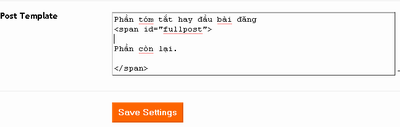
Step 3: Now create a new post and click on the Edit HTML tab (Edit HTML), you must enter the post under this structure.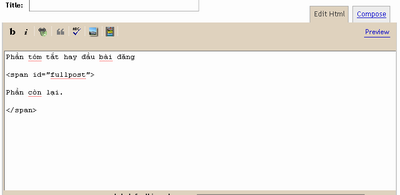
(**) Using collapsible link list:
[+/-] Show name
o The name of the link first
o The name of the link 2
NAME SOLE: It is a unique name, do not overlap so you can use multiple linked list. And link 1, 2 corresponds to the link listed in that list.
Paste this code to add HTML / JavaScript stored on the sidebar.
Download Template here (.rar file)
Demo.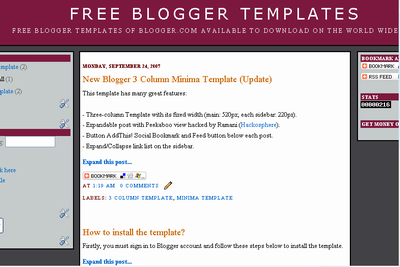
A different type of display (both along the right sidebar):
Download
Display as shown: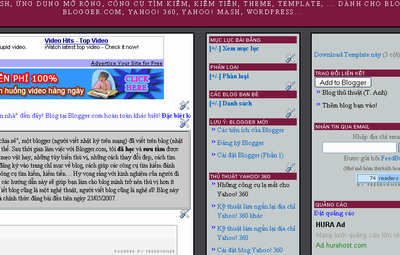
(At the time of this tutorial. Blog is your online demo).
Both models for the new Blogger completely. To prevent errors you have to refer to guidance on backup and recovery.
Wish you success.
Automatically Encode / Decode HTML
 thành mã HTML nhưng do site đó không còn hoạt động nên mình xin giới thiệu các bạn 1 trang khác.">At first, you've been introduced to a website lets you automatically convert special characters like <> into HTML by the site but that no longer work so you would like to introduce you a different page.
Centricle will help you move the character is easily and quickly. All you need to do is enter the encryption code is not empty frame, then click Encode (encoding) to proceed. This happens very quickly so you do not spend much time to worry. If you want to move back from HTML, you use the button to Decode (decoding). That's it! Hopefully this website will be useful for you. Wish fun!
12/27/09
Switching between BBCode and HTML
BBCode is an abbreviation for Bulletin Board Code, this is a small language be added to format articles for newsletters. BBCode also called code forum. Effects of BBCode is out of character, or sentence through links from the small square blocks, and they will form a system of information before being converted into language that web browsers can translate which are usually HTML or XHTML.
HTML stands for HyperText Markup Language, ie "markup language hypertext markup language is designed to create a website, that is the piece of information is presented on the World Wide Web. Is defined as a simple application of SGML, which is used in organizations should be required to publish complex, HTML is now becoming a standard Internet by organized World Wide Web Consortium (W3C) only maintenance. The latest version of it is HTML 4.01. However, HTML is no longer being developed more. They have replaced it with XHTML.
Second language is very common in programming site, forum. However, because a limited number at which we only used one language while mastering other languages (such as the familiar web programming using HTML, but less pure on BBCode). Easy to use, you would provide assistance in two sites using the two parallel language. You can open up Encyclopedia Vietnam to find out more
BBCode to HTML conversion
Converted into HTML BBCode
Subscribe to:
Posts (Atom)